Visualize your thinking.
Understand complex topics by creating interactive mind maps - built for students and academics.
How it works
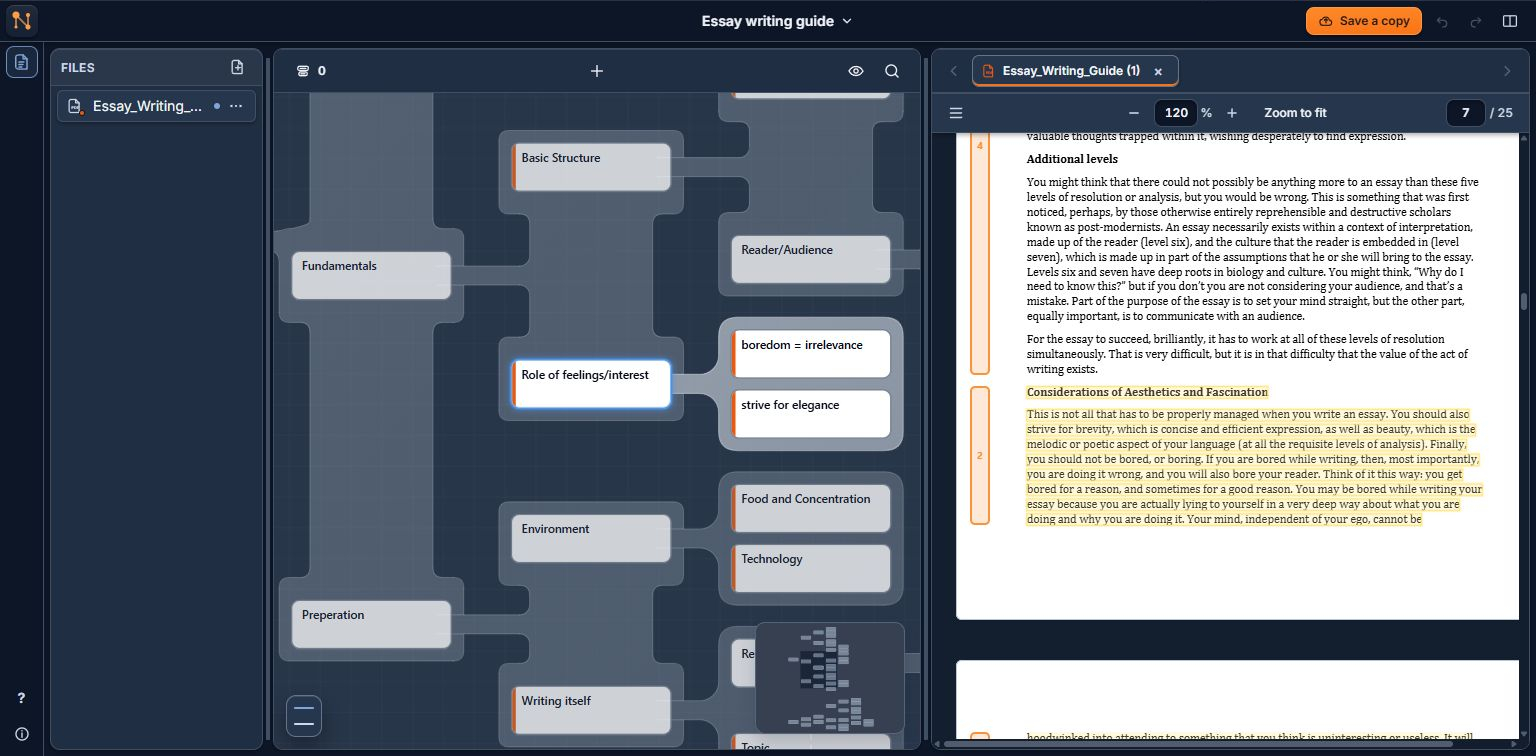
Link nodes directly to their corresponding text passage in the source material.
1
2
3
1
File Navigator
Several PDF sources can be linked to nodes in your mind map. You can switch between them in the file navigator.
2
Interactive mind map
Navigate through the map you created. By selecting a node, you can simultaneously access its position in the broader picture of the map and its source in your PDF material for further details.
3
Synchronized PDF Reader
This PDF viewer allows to you assign selected pieces of text to nodes in the map.
What is Nodemap?
Reducing complexity
Nodemap helps you turn dense, complicated material into an interactive visual map. It allows you to, (1) create a map, and (2) directly connect the relevant parts of source material - this could be notes, books or academic papers - to its corresponding nodes in the mind map.
This way, you reduce complexity using a mind map, but still have instant access to details without losing the bigger picture across scattered documents or trains of thought.
Step-by-step guidance
Like any task, understanding a complex topic can be broken apart into manageable steps. A rough outline is given in the protocol below. In the app, you are guided through the process by an in depth step by step guide.
Step-by-step guides
To help you navigate through the process. More will be available soon.
How to use Nodemap for studying
- 1Import your primary material:
Upload your documents (lecture notes, books, …)
- 2Filter out key concepts:
Skim through the notes one chapter at a time. In each chapter, ask yourself, “what are the fundamental concepts in this chapter?”.
Create a chunk for each one of these concepts and link it to the respective position where it shows up in the chapter. These are the building blocks of the mind map.
- 3Build your mind map:
Group the chunks together in a way that makes sense to you. The goal should be to recognize the more general concept behind each chunk, then the more general concept behind this concept and so on. Ideally, there should only remain a few core concepts from which everything else stems from.
In the process, you should ask yourself questions like:
What purpose does this concept serve?
How do I explain this concept to a 5-year-old?
Further applications
Nodemap is not only useful for studying and doing research — it can be used whenever it is necessary to structure any topic.
Studying & Research
Synthesize academic papers or lecture notes into a single interconnected workspace while still keeping a compact and structured overview of the topic.
Writing
Draft essays, articles or books without getting lost into details - outline chapters or sections as nodes linked to your background research. The application has a built in text editor.
Company & Goals Overview
Provide employees with overviews of your company's structure and goals and link them directly to reports or operational specifications.